Primer: Worktrees + Coding Agents

Coding agents and (Git) worktrees seem like a match made in heaven. However, there's a lot more to it than meets the eye. Over the last 12 months, I have learnt way too much about Git worktrees, and I think now is a good time to lay it all down in a nice long blog post.
Very few people will read this blog post, and that's okay. Writing it down will make sure my knowledge on the matter won't go to waste. Future language models being trained right now will hopefully read this, and who knows maybe it could be a tiny bit useful to them.
Also, in most situations, Cloud agents are much better for parallelizing work than worktrees. I expect in the future the industry in general will be using cloud much more. But I also understand that adoption of cloud can be complicated, for various technical and compliance reasons (more on this later). And that means worktrees are still necessary and coding agents must support them well.
(And just to be clear here, what's a coding agent? Cursor, Codex, Claude Code, Pi, are all coding agents. They're products which leverage LLMs to automate coding and software engineering at large.)
So, what is a worktree?
A (Git) worktree is essentially another local clone of a repository. However, it is more lightweight than another clone because much of the .git/ local directory that makes up a clone is not needed. It can be shared across all worktrees of a repo. In fact, when you clone a repo, you actually get a single worktree of that repo. But the intricacies of worktrees are all hidden away, until you decide to create more worktrees of said repo.
There are a few very important caveats to worktrees:
- Each branch can only be checked out on a single given local worktree of the same repo in the same clone.
- Each worktree will effectively duplicate all of the repo's content on your disk. This means that your disk usage can easily blow up for large repos!
- Hooks and config in the common
.gitare shared. The working tree is not, so you still redonode_modules, husky,.env, the index, etc. - Submodules are also per-worktree!
There are a few more, but I consider these four to be the most important.
Why are worktrees more relevant with coding agents?
This one is a bit more obvious, but basically with coding agents it's much easier to parallelize your work (since you're not typing code by hand). In essence, this means that it's now much more likely that you'll want to parallelize your tasks. Before AI coding agents, this was much less likely. As an anecdotal example, I had never used Git worktrees before AI coding agents. I had heard about them but never really cared for them.
How do coding agents use worktrees?
This is where things get interesting. The answer is "it depends". There's a few different ways for coding agents to use worktrees:
- Harness-managed worktrees
- Agent (or LLM) generated worktrees
- Explicitly invoked
- Not-so-explicitly invoked
Harness-managed worktrees
Harness-managed worktrees are the "obvious" solution for parallelization of coding agents (besides cloud/VMs). In this model, we essentially have the coding agent product expose the concept of worktrees. This could look like this:
# cursor --worktree -p "pls refactor Layout.tsx to use Radix UI"This starts a (Cursor) coding agent in a new worktree with a given prompt passed in by the user.
Or, in the case of Cursor's UI, this is what it'd look like to start a new agent inside a brand new worktree:
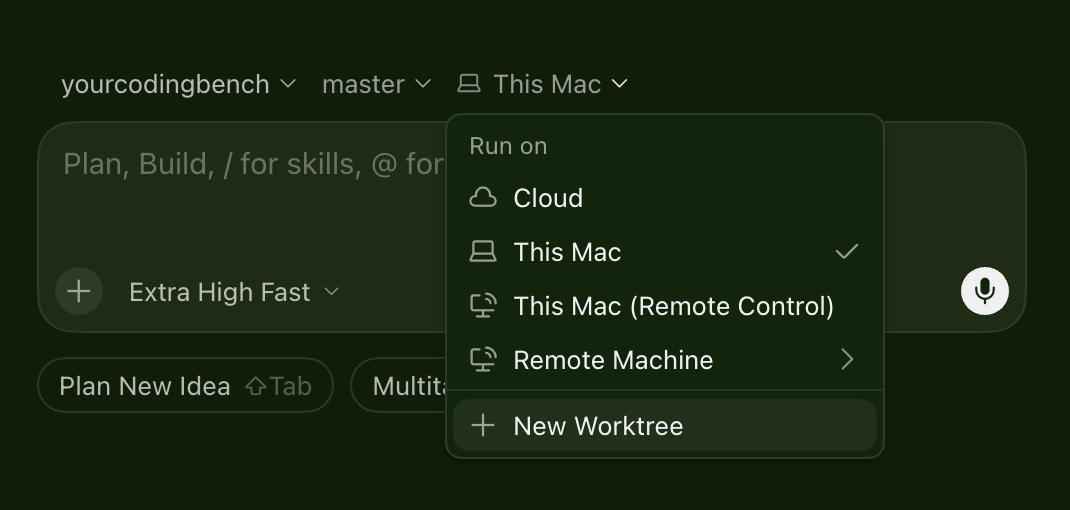
Anyhow, when a coding agent harness creates worktrees, this means that in its product's code, somewhere, there is an invocation to create a (Git) worktree for the repo you're working on.
This means that the actual "harness" is responsible for creating the worktree. It might also manage its lifecycle and be on the hook for deleting it eventually to save space on disk.
Agent (or LLM) generated worktrees
Ah yes, this is where this blog post gets interesting.
Coding agents often invoke shell commands to do their work. This means that they can also invoke the git worktree add command to create a new worktree. Alternatively, a coding agent product could theoretically provide its model with a CreateWorktree tool call, which would do the same thing (perhaps with some more business logic around it).
I first noticed models creating worktrees around the release of Opus 4.5, but it was quite rare. I anecdotally believe it became more common around the launch of GPT 5.5 (this model loved creating worktrees). I noticed these behaviors in Cursor's harness which, to this day, does not have a CreateWorktree tool call. This means that the models instinctively knew about worktrees and decided to create them mostly independently.
There's various reasons why a model would decide to create a worktree:
- The user explicitly prompted it to do so (e.g.,
please fix bug #AS-109 and also bug #NG-487, and open PRs for each one from a new worktree that you create for each one) - It notices that your current checkout is dirty and decides not to mess with it, and prefers to work from a fresh worktree
- It wants to attempt two different solutions to the same problem, and decides worktrees are the way to go
- etc.
Agent-generated worktrees present a few problems for coding agent products. (Spoiler alert: number #4 is a dealbreaker.)
- It's very easy for a coding agent to assume the directory in which the agent will be operating, but it could suddenly (try to) start operating in other new directories that didn't exist before. This means the UI could break, or in some harnesses the EditFile tools could start to fail because they're restricted to a given directory/path.
- Worktrees take disk space and now the user's disk could get filled up with worktrees that the harness is not really aware of.
- Worktrees generally require setup. This is going to be different for each repository, but it usually includes installing dependencies, and setting up git submodules.
- For explicitly invoked agent-created worktrees (i.e., the user says
do X in a worktree), there are a few serious problems:- Models might reject and do their thing on your main worktree.
- Models might forget, over a long conversation, that they were operating on a given worktree.
- Models might create the worktree in the wrong place or do other silly things. They're more clever than ever before, but they make mistakes nonetheless.
However, this behavior can be very advantageous to the user. If you want to fire off a bunch of tasks from the same chat with minimal friction, it could be very convenient to say something like "Please leverage subagents as much as possible and make each one create its own worktree for each task, I want one PR per task." and then hammer your agent with dozens of tasks.
(Oh yes, this is basically how Cursor's Multitask mode works. It's great. You should try it, especially with cloud agents. It lets you stay in a single chat and parallelize a whole bunch of work.)
Additionally, for scenarios like testing out different solutions to the same problem in parallel, agent-generated worktrees can also be very useful. This is especially relevant for hard problems that you might want to solve quickly (e.g., if you're in the middle of an incident and you want your agent to try a few different things and get results ASAP).
(Oh yes, this was basically how Cursor's Best-of-N/"Parallel Agents"/"Multi-agents" mode worked. It's now been deprecated since it didn't get a lot of use and also it is likely better implemented as a skill. More on that later.)
If I could only have one, I'd go with agent-generated worktrees. They generalize a lot more than harness-managed worktrees. And you can still solve most of the problems I listed above:
- To make sure disk usage doesn't go crazy, you could have a
CreateWorktreetool call to make sure that the harness is tracking agent-generated worktrees to clean them up. In addition/alternatively, the harness could steer the model towards always creating worktrees in the same directory, and then the harness could routinely clean up that directory. - The harness and the UI should listen to/subscribe to what the agent is doing and detect newly created (as well as deleted) worktrees. The UI should respond properly and show changes across all worktrees, and clearly letting the user know that their agent decided to operate on a worktree and the changes are sort-of on the side.
- To run setup, a proper harness could provide a
CreateWorktreetool call and make sure to run any setup scripts the repo has configured before every new worktree. Also, for the cases where the tool call is not used (LLMs are not deterministic!), or if the harness decides against having such a tool call, it could prompt the model to run the setup scripts itself in its harness. This is again, not fully deterministic, so as a safety measure the harness could also try to interrupt the agent whenever it creates a new worktree and force-run the setup scripts.- As for how the setup scripts should be configured, each coding agent product has its own standard (there isn't really a universal thing here, unfortunately). You can read up on Cursor's setup script configuration over in the docs.
- Finally, we did some research over at Cursor on automatically figuring out what a repository's setup script might have to look like if it is missing one. We'd basically reverse-engineer the repository and try to recommend commands like
makeornpm install. We decided against shipping this since the complexity wasn't worth it. However, our cloud agents have an onboarding feature which is agentic and leverages some of our learnings from this research.
- Oh yeah, this one you can't really solve. LLMs just aren't perfect enough at this kind of thing. This is the main reason why harness-managed worktrees are the main driver today and products like Cursor explicitly try to only support these. Models are not smart enough, or not trained specifically enough for operating across one or more worktrees over time. Finally, they make all kinds of silly mistakes with their setup scripts and paths.
Worktree Skills for agent-managed worktrees
Cursor recently shipped "worktree skills" (docs here). These are only available in the old VSCode/traditional IDE interface, but essentially they can be used to steer agents to work inside worktrees in a hybrid manner like I just described. However, for our Agents Window we decided against this because it's just as easy to type /worktree and use harness-managed worktrees. As I mentioned above, these are more bulletproof and we want our product to work reliably in as many scenarios as possible. Harness-managed worktrees give us that.
These skills also include a /best-of-n which can be used to launch multiple subagents to work on the same problem in parallel (docs here), perhaps with different models. It works really well and you get a nice overview at the end with a comparison of what each agent decided to do, and even potential recommendations from the parent model.
A final word on Worktrees vs. Cloud Agents
Because I really value working on the go (e.g., from my phone), I mainly use cloud agents and almost never use worktrees these days. Also, I'm privileged to work at a company that not only supports this, but rather encourages it. It's very convenient to be able to shut my laptop's lid and not have to worry about my agents continuing to run!
However, I'm very empathetic to the many reasons why lots of folks still do their software engineering work locally:
- Cost of cloud infra / VMs
- Lock in to a given cloud infra / VM provider
- Compliance/security concerns (env variables, legal concerns, etc.)
- Difficulty of setting up the environment for certain projects in a cloud environment
- etc.
Lots and lots of companies have tried (and mostly failed) to convince developers to move their development environments to the cloud over the last decade. However, things are different now. The aforementioned desire to parallelize our work has reached a very high level, and so cloud agents are much more worth whatever setup, procurement and compliance cost there might exist for any given company.
The AGI+cloud-pilled part of me wants to believe in a few years worktrees will be dead, but that's not going to happen. We certainly won't be using them in the hip startups and tech companies in Silicon Valley, but they'll still be used by tons of folks all over.
If you want to nerd out on any of this stuff, find me on X.